NOTES / AGENTIC DESIGN PATTERNS
Human in the loop
Pausing an agent for a person to approve, edit or reject what it is about to do: where to put the gate, and what has to be saved while it waits.
Why a person is in the loop
Some actions should not happen on the model’s judgement alone: paying money, deleting data, sending a message to a customer. A human-in-the-loop step makes the agent stop before the action and wait for a decision. OpenAI’s guide treats human intervention as an important safeguard, especially for high-risk actions and for cases where an agent keeps failing to complete a task3. Anthropic describes agents that can pause for human feedback at checkpoints or when they hit a blocker4.
The gate
The usual implementation is an interrupt. In LangGraph, calling interrupt saves the graph’s state through its persistence layer and waits for you to resume with input; the pause can last indefinitely1. The human’s answer then decides what happens next.
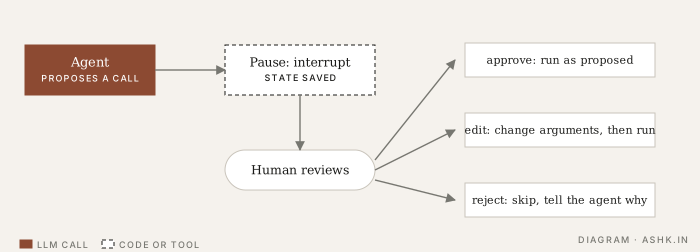
Diagram: my own, following the flow in 1 and 2.
LangChain’s middleware names four built-in responses to a paused tool call2:
- approve: run it exactly as proposed;
- edit: change the arguments, then run it;
- reject: do not run it, and add an explanation to the conversation so the agent can adjust;
- respond: answer directly, which suits “ask the user” style tools.
The LangGraph docs list four typical designs built from the same primitive: approve or reject before a critical step, review and edit the tool calls the model requested, review and edit state, and validate human input1.
What has to be saved
Pausing is only useful if the run can resume. The interrupt works because the state is persisted, so execution can pause safely and continue later2. Without that, the process holding the run must stay alive, which fails the first time the reviewer takes an hour. This is the reason State and checkpoints sits next to this note.
Where to put gates
Do not gate everything; reviewers will click “approve” without reading. Gate by risk, which LangChain’s configuration also supports by letting each tool choose which decisions are allowed, and some tools none at all2.
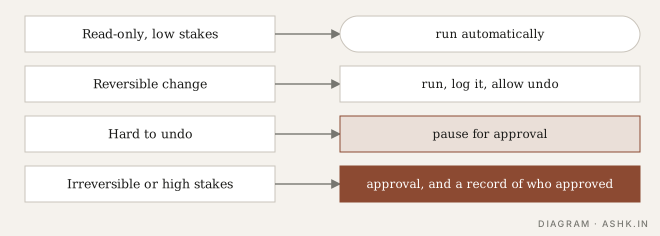
Diagram: my own and illustrative. Set the tiers by your own stakes.
A few working rules of mine:
- Classify by reversibility and blast radius, not by tool name.
- Show the reviewer the exact action with arguments, not a vague summary.
- Time-box requests and decide what happens on timeout. Default to not acting.
- Record who approved what. It belongs in your trace.
- Enforce, don’t just ask. A gate in the harness, or a hook, cannot be talked out of firing the way an instruction in the prompt can.
Relation to autonomy levels
Human-in-the-loop is how the “approver” level is built: the agent acts alone until a risky or pre-specified situation arrives, then involves the user5. See Levels of autonomy. Approval design for safety is continued in Human approval.
Sources
- [1]Human-in-the-loop (add human-in-the-loop with interrupts) — LangChain, LangGraph docsPARAPHRASED
- [2]Human-in-the-loop middleware — LangChain docsPARAPHRASED
- [3]A practical guide to building agents — OpenAI · 2025PARAPHRASED
- [4]Building effective agents — Erik Schluntz and Barry Zhang · Anthropic · 2024PARAPHRASED
- [5]Levels of Autonomy for AI Agents — K. J. Kevin Feng, David W. McDonald, Amy X. Zhang · arXiv · 2025FURTHER READING