Claude Agent SDK
The agent loop, built-in tools and context management that power Claude Code, packaged as a Python and TypeScript library you embed in your own app.
What it is
Anthropic’s docs describe the Agent SDK as a way to build agents on the same tools, agent loop and context management that power Claude Code1. It is available for Python and TypeScript. Where the plain model API leaves you to implement the tool loop, the SDK runs it for you: you send a prompt, the agent reads and edits files, runs commands, searches and calls tools, and streams messages back.
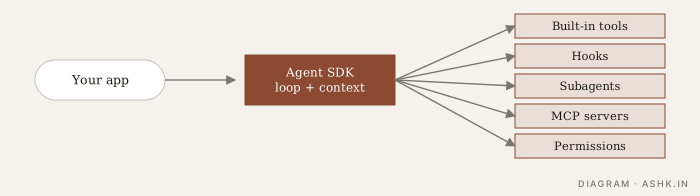
Diagram: my own.
What you get
The overview groups the capabilities1:
- Built-in tools for reading, writing and editing files, running shell commands, searching and fetching from the web, so you do not implement them3.
- Hooks that run your code at key points in the agent lifecycle, such as before or after a tool call. See Hooks.
- Subagents for delegating focused subtasks (Subagents).
- MCP to connect external tools and data sources (MCP).
- Permissions to control which tools the agent may use.
- Sessions, so work can be resumed.
The API docs also list production features: error handling, session management and monitoring, plus automatic prompt caching and other optimisations for Claude2.
Controlling what it can do
Permissions are central. The docs describe settings to explicitly allow tools, to block specific tools, and to set an overall permission mode2. A common pattern is to start restrictive, for example read-only tools, and widen deliberately. Combine this with sandboxing and approvals; the SDK does not remove the need for them. See Permissions and Sandboxing.
When it fits
My assessment:
- Good fit: agents that work with files, code and shell commands, such as coding, research over documents, data cleanup and operations tasks, where the built-in toolset matches the job.
- Less fit: pure chat or classification flows that need no tools, where a plain API call is simpler (Building without a framework).
- Trade-off: you adopt Claude Code’s loop and conventions in return for not building your own. You have less control over low-level behaviour than with a hand-written loop.
- Models: it is built around Claude models, so it is not the choice if you must swap providers freely.
Practical tips
- Define your own tools with clear descriptions and pass them via MCP or the SDK’s tool mechanism (Tool design).
- Set turn and budget limits (Stopping conditions).
- Use hooks for logging, policy checks and blocking dangerous commands.
- Give subagents narrow tools so a side task cannot flood the main context (Context window as a budget).
- Log and review transcripts (Tracing and monitoring).
- Check the current docs. The SDK has been renamed and changed since launch, and option names move.
For a coding-focused look at this style of harness, see Coding agents. Compare with others in Choosing a framework.
Sources
- [1]Agent SDK overview — Anthropic, Claude Code docsPARAPHRASED
- [2]Agent SDK overview (API docs) — AnthropicPARAPHRASED
- [3]Claude Agent SDK overview — Anthropic, via Beri learning indexPARAPHRASED