Hooks and lifecycle events
Deterministic code that runs at fixed points in an agent's lifecycle: how hooks differ from prompts, what events exist, and what to use them for.
Instructions versus guarantees
You can ask a model to follow a rule (“never edit files in migrations/”), and it will usually comply. But “usually” is not good enough for rules that matter. A hook is code the harness runs at a specific point in the agent’s lifecycle, regardless of what the model decided. In Claude Code, hooks are user-defined shell commands, HTTP endpoints or LLM prompts that run automatically at specific points in its lifecycle1. One write-up puts the difference neatly: instructions in a file like CLAUDE.md are things the model will probably follow, while hooks execute whether or not the model cooperates3.
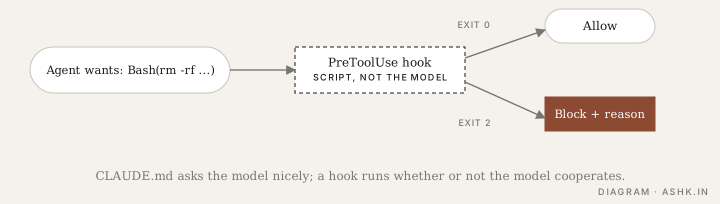
Diagram: my own. The exit-code behaviour follows 3; check the current docs for details.
Where hooks fire
Hooks attach to events. In Claude Code the events come in three cadences: once per session, once per turn (such as UserPromptSubmit and Stop), and on every tool call inside the agentic loop (PreToolUse and PostToolUse)2. There are also events for permission requests, subagent start and stop, compaction and session start and end1.
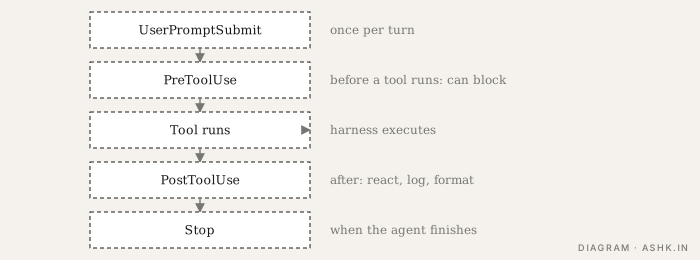
Diagram: my own, a simplified sequence based on 1 and 2. The real lifecycle has more events.
When an event fires and a matcher matches, Claude Code passes JSON about the event to the handler; command hooks receive it on standard input2. For tool events the matcher is tested against the tool name, and MCP tools appear as regular tools, so you can match them the same way2. A configuration looks like this (from the documented shape):
{
  "hooks": {
    "PostToolUse": [
      {
        "matcher": "Write|Edit",
        "hooks": [
          { "type": "command",
            "command": "\"$CLAUDE_PROJECT_DIR\"/.claude/hooks/check-style.sh" }
        ]
      }
    ]
  }
}
Allow, block, react
What a hook can do depends on the event. A PreToolUse hook runs before the tool and can block it, sending the reason back to the model. A PostToolUse hook runs after the tool already ran, so it can react (format the file, run a linter, log) but not undo it. A reference summary puts exit code 0 as allow and exit code 2 as block on events that can block, and warns that exit code 1, the conventional Unix failure code, blocks nothing, which is the biggest footgun3. Always confirm against the current reference, since this area changes quickly.
Good uses
- Guardrails: block reads of
.env, destructive commands, writes outside a directory. - Quality gates: run formatter, linter or tests after edits and feed failures back.
- Audit logging: record every tool call to your own store, feeding tracing.
- Notifications: tell a person when the agent needs input.
- Context injection: add the current branch or ticket at session start.
Cautions
Hooks are code you run with your permissions, so review them like any other script, and avoid hooks that quietly slow every tool call. A guardrail that is only a prompt is not a guardrail; for real safety combine hooks with permissions and sandboxing. Hooks are not Claude-specific: the same idea (middleware at lifecycle points) appears in the Agent SDK as in-process callbacks3, and in other frameworks under different names.
Sources
- [1]Hooks reference — Anthropic, Claude Code documentationPARAPHRASED
- [2]Automate actions with hooks (guide) — Anthropic, Claude Code documentationPARAPHRASED
- [3]Claude Code Hooks Explained: The Deterministic Layer Around Your Agent — Blake Crosley · blakecrosley.com · 2026PARAPHRASED