OpenAI Agents SDK
A lightweight SDK built on a few primitives: agents, handoffs, guardrails, sessions and tracing, with a managed run loop.
The primitives
OpenAI describes the Agents SDK as having a very small set of primitives2:
- Agents: models configured with instructions and tools.
- Agents as tools and handoffs: ways to delegate to other agents for specific tasks.
- Guardrails: validation of agent inputs and outputs.
- Sessions: automatic conversation-history management across runs.
- Tracing: built-in tracking of runs so you can view, debug and optimise workflows2.
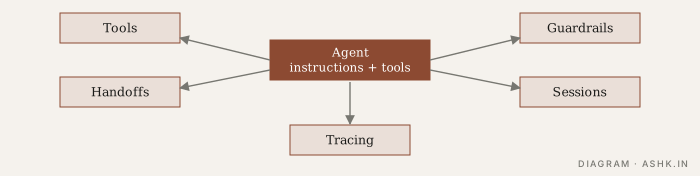
Diagram: my own.
A runner manages the loop: it calls the model, executes tool calls, follows handoffs and repeats until there is a final output. The docs also cover streaming, asynchronous and batched execution, cancellation and error handling1.
Handoffs versus agents as tools
The SDK offers two ways to compose agents, and the choice matters. A handoff is a specialised tool call that transfers control to another agent, which then continues the conversation2. An agent as a tool keeps the caller in charge: it calls the specialist, receives a result and decides what to do next. The docs have a guide on choosing between handoffs and manager-style orchestration1.
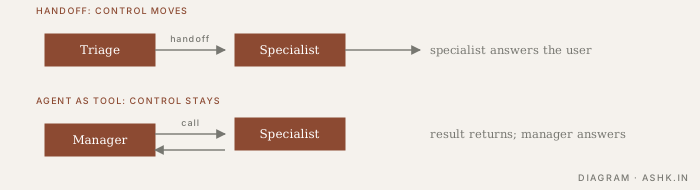
Diagram: my own.
My rule of thumb: use handoffs for routing to a specialist who then owns the conversation, and agents-as-tools when one coordinator must combine several specialists’ outputs. See Multi-agent systems for the trade-offs.
Guardrails
Guardrails run input and output checks alongside the agent, and the README says they run in parallel with the agent and break early if the checks fail2. This is useful for cheap, fast validation, such as screening an input for off-topic or unsafe requests while the main agent is working. It does not replace permissions, sandboxing or approvals for risky actions; see Input and output guardrails. OpenAI’s guide also groups guardrails with human review for cases that need approval3.
Models and providers
The README describes the SDK as provider-agnostic: it supports OpenAI’s Responses and Chat Completions APIs and, according to the project, many other models2. Behaviour can differ across providers, so test the model you intend to ship.
Strengths and trade-offs
My assessment from the docs:
- Strengths: small surface area, quick to learn, tracing included, handoffs make routing simple.
- Watch for: the defaults favour OpenAI’s APIs and hosted tracing; check data-handling terms before sending sensitive traces. Durable long-running state is not the focus compared with a graph runtime such as LangGraph.
- Fit: assistants with several specialists, customer-support style routing, and teams already on OpenAI models.
Tips
- Give each agent one clear job and a short description so routing works.
- Keep tool outputs small (Tool design).
- Use sessions for continuity, and cap history to protect the context budget.
- Review traces regularly (Tracing and monitoring).
Compare options in Choosing a framework.
Sources
- [1]OpenAI Agents SDK documentation — OpenAIPARAPHRASED
- [2]openai-agents-python README — OpenAI, GitHubPARAPHRASED
- [3]Agents SDK guide — OpenAI developersPARAPHRASED