Model Context Protocol (MCP)
The open protocol that lets an agent connect to tools and data through a standard interface: hosts, clients, servers and what servers can offer.
The problem it solves
Without a standard, every app that wants to give a model access to some service (a database, a calendar, an issue tracker) writes its own connector, and every service has to be integrated again for every app. The Model Context Protocol is an open protocol for integrating LLM applications with external data sources and tools1. It takes inspiration from the Language Server Protocol, which did the same job for programming-language support across editors1.
Architecture
MCP uses JSON-RPC 2.0 messages between three roles1:
- Hosts: the LLM applications that start connections.
- Clients: connectors living inside the host.
- Servers: services that provide context and capabilities.
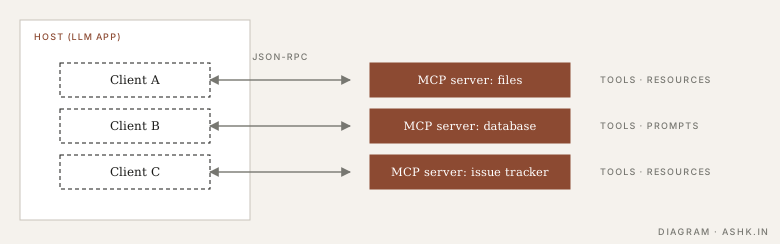
Diagram: my own, after the architecture in 1.
A host typically runs one client per server, so each connection is isolated. A server can run locally (for example over standard input and output) or remotely over HTTP; the transport is a separate concern from what is exchanged.
What servers offer
The specification lists three server features1:
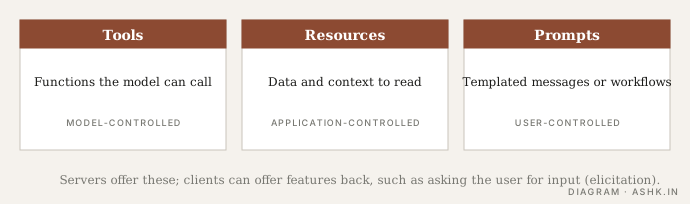
Diagram: my own, using the feature list in 1.
| Feature | What it is | Who decides to use it |
|---|---|---|
| Tools | Functions for the model to execute | The model |
| Resources | Context and data for the user or the model | The application |
| Prompts | Templated messages and workflows | The user |
Clients can offer features back to servers. The current specification lists elicitation, where a server asks the user for more information, and earlier versions also had sampling, where a server asks the client’s model to generate text1. There are also utilities such as progress tracking, cancellation and error reporting1.
For a harness, the practical effect is that MCP tools show up in the tool registry like any others. Anthropic notes that MCP can give an agent potentially hundreds of tools, which is why tool quality and selection matter2.
Security
The spec is blunt that MCP enables powerful capabilities through arbitrary data access and code execution paths, and that tools in particular represent arbitrary code execution and need caution1. It asks hosts to get explicit user consent before invoking tools and before sharing data1. Treat any server you did not write as untrusted input. Tool descriptions and results can carry prompt injection, so apply permissions and hooks to MCP tools the way you would for built-in ones.
When to use it
Use MCP when you want a capability to be reusable across several agents or apps, or when an ecosystem server already exists. For a single bespoke tool inside one application, a plain function in your registry is simpler, with no extra process or protocol. MCP is about connecting agents to tools and data. Connecting agents to other agents is a different problem, covered next in A2A3.
Sources
- [1]Model Context Protocol specification — modelcontextprotocol.ioPARAPHRASED
- [2]Writing effective tools for agents — with agents — Anthropic Engineering · Anthropic · 2025PARAPHRASED
- [3]Google donates A2A protocol to Linux Foundation — Techstrong.ai · 2025PARAPHRASED