Tool design and the tool registry
Tools are a contract between deterministic software and a non-deterministic caller. How to design them for agents, and how to improve them with evals.
Tool calling covers how a model asks for a tool. This note is about the other side: designing the tools themselves, and the registry that holds them in the harness.
A new kind of software
Anthropic describes a tool as a contract between deterministic systems and non-deterministic agents1. A normal function is called by code that knows exactly what it wants. A tool is called by a model that guesses from a name and a description. So Anthropic’s conclusion is that you shouldn’t write tools the way you’d write functions and APIs for other developers; you should design them for agents1.
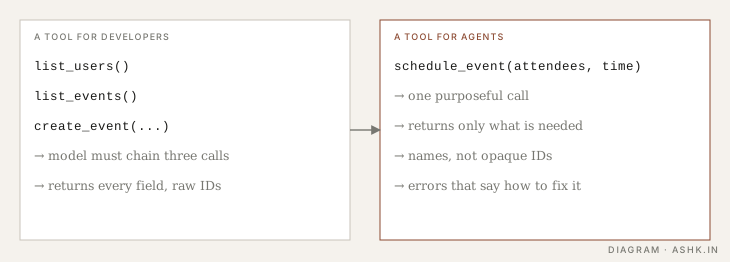
Diagram: my own, illustrating the principles in 1.
Principles that recur
These are the ideas Anthropic’s guidance returns to, in my own words1:
- Fewer, more purposeful tools. Several small API-shaped tools force the model to chain calls and carry data between them. One tool that does the whole job (schedule an event, not list-users then list-events then create-event) is easier to use correctly.
- Clear names and namespacing. Related tools should share a recognisable prefix, so the model can tell similar tools apart.
- Return meaning, not plumbing. Prefer human-readable names over opaque IDs and drop fields the model will not use. Large outputs eat context; consider pagination, filtering or a “concise” and “detailed” response option.
- Helpful errors. An error that says what was wrong and how to fix it lets the model recover. “Invalid input” does not.
- Write the description like onboarding a new colleague. Spell out formats, what each parameter means and when not to use the tool. Small wording changes to a description can move performance noticeably.
Interfaces designed for the model
The same idea shows up in research. The SWE-agent paper argues that language-model agents are a new kind of user, with their own needs and abilities, who benefit from interfaces built for them. Its agent-computer interface (ACI) is a layer between the model and the computer with model-friendly commands and feedback, and the authors report that this design significantly improves the agent’s ability to edit code, navigate repositories and run tests2.
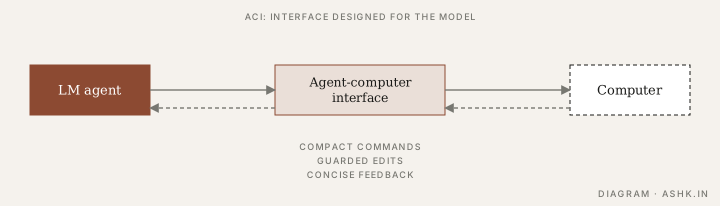
Diagram: my own, after the ACI idea in 2.
The lesson for your harness: don’t just expose the raw shell or raw API. Shape what the model sees. Compact commands, checks that catch an invalid edit before it lands, and concise feedback all affect how well the same model performs2.
The registry
A harness keeps a tool registry: the list of tools offered to the model, each with a name, description, input schema and the code that runs it. In practice the registry does a few jobs:
TOOLS = {
    "get_lab_results": Tool(
        description="Fetch lab results for one patient and test. Use for any "
                    "question about a lab value. Not for medications.",
        schema={"patient_id": "str", "test_name": "str"},
        run=get_lab_results,
        read_only=True,          # lets the harness auto-approve it
    ),
}
It validates arguments against the schema before running; it holds metadata the harness uses (read-only or not, timeouts, permissions); and it decides which tools to show on a given turn. Every tool definition costs context, so large registries can crowd the window. Offer only the tools a task needs, or load tool definitions on demand, rather than listing hundreds up front. (See MCP for how external tools join the registry.)
Improve tools with evals
Anthropic’s recommended loop treats tools like any other component you measure1:
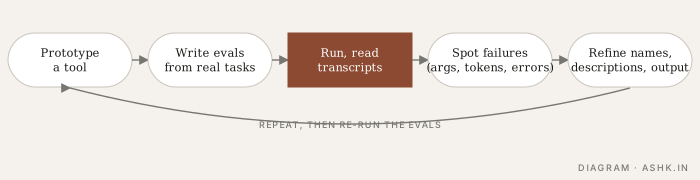
Diagram: my own, following the workflow in 1.
Build a quick prototype, write evaluation tasks that reflect real, multi-step use, run them, and read the transcripts to see where the agent misuses a tool, wastes tokens or hits confusing errors. Then change names, descriptions and outputs and re-run. This is the same cycle as eval-driven development, applied to a tool, and tool-call scoring from Evaluating routers, tools and skills fits straight in. Anthropic also reports using agents themselves to analyse transcripts and suggest tool improvements1.
Sources
- [1]Writing effective tools for agents — with agents — Anthropic Engineering · Anthropic · 2025PARAPHRASED
- [2]SWE-agent: Agent-Computer Interfaces Enable Automated Software Engineering — John Yang, Carlos E. Jimenez, Alexander Wettig and others · NeurIPS 2024 (arXiv:2405.15793) · 2024PARAPHRASED
- [3]Tools for agents (study notes) — CS146S handbookFURTHER READING